Simple Task: A Display Font for Editorial Design
As a content creator and editorial designer, I’ve spent years exploring fonts that can elevate the visual tone of publications without compromising readability. Simple Task stands out as a versatile display font that brings both personality and practicality to editorial projects. With its distinctive handwritten characters, this font is ideal for branding, logos, and creative layouts where a touch of charm meets clarity.
What Makes Simple Task Unique?
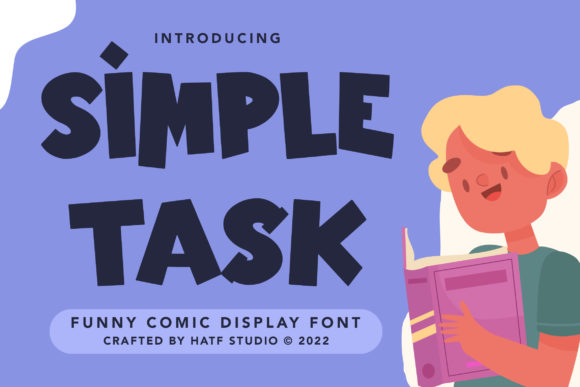
Simple Task is more than just a font—it’s a design asset with a clear visual identity. Its handwritten style gives it a friendly, approachable feel, while its clean lines ensure it remains legible even in larger formats. The font’s character design balances whimsy with professionalism, making it suitable for a wide range of editorial applications.
The personality of Simple Task is warm and inviting, which makes it perfect for content that aims to connect with readers on a personal level. Whether used in a blog header or a product packaging design, it adds a subtle but noticeable flair that enhances the overall aesthetic of the project.
Using Simple Task in Editorial Design
In editorial design, typography plays a crucial role in guiding the reader’s eye and setting the tone of the content. Simple Task excels in creating visual hierarchy within layouts. For instance, using it for headlines or section titles can draw attention immediately, while its subtler variations can be used for pull quotes or sidebars to add visual interest without overwhelming the reader.
When designing a magazine cover or an ebook title, Simple Task offers a striking contrast to traditional serif or sans-serif fonts. Its handwritten nature introduces a sense of creativity and individuality that aligns well with modern typography trends. It’s also excellent for creating engaging quote graphics, chapter openers, or lead magnets that stand out in a digital or print format.
One of the most effective ways to use Simple Task is in combination with other fonts. Pairing it with a readable serif or sans-serif font for body copy creates a balanced layout that maintains both style and functionality. This pairing works especially well in newsletters, guides, and printable materials where clarity is essential.
Practical Applications Across Content Types
Simple Task is incredibly adaptable. For lifestyle blogs, it can be used in headers and social media graphics to create a cohesive brand identity. In recipe ebooks, it adds a playful yet professional touch to titles and captions. When designing wedding guides or coaching workbooks, the font’s charm helps convey warmth and approachability.
For digital magazines and online publications, Simple Task can be used in headers, navigation menus, or call-to-action buttons to enhance user engagement. It also performs well in mobile layouts and PDF exports, ensuring that the text remains crisp and readable across different platforms.
When it comes to print, Simple Task holds up beautifully on physical pages. Whether it’s a printable planner, a course workbook, or a branded newsletter, the font maintains its clarity and character, making it a reliable choice for both screen and print.
Readability and Commercial Use
While aesthetics are important, readability should never be compromised. Simple Task is designed with readability in mind, making it suitable for longer reading sections when used appropriately. However, it’s best reserved for headings, titles, and accent typography rather than large blocks of body text.
For commercial use, it’s important to check the licensing terms. Simple Task is available as a premium font, allowing creators to use it in ebooks, templates, printables, paid newsletters, and client publications. Its commercial license ensures that you can confidently incorporate it into your design assets without legal concerns.
Font Pairing and Design Consistency
When designing for brand identity, consistency is key. Simple Task can be paired with a clean sans serif font for captions, navigation elements, or footnotes, creating a visually harmonious layout. Alternatively, pairing it with a classic serif font for body copy can provide a strong contrast that enhances the readability of the content.
It’s also worth considering the included styles, alternates, ligatures, and weights when selecting a font. These features allow for greater flexibility in design, enabling you to adapt Simple Task to different editorial needs without sacrificing quality or style.
Additionally, checking for multilingual support is important if your content reaches a global audience. Simple Task’s versatility in this regard makes it a valuable tool for international publishing projects.
Final Thoughts on Simple Task
Simple Task is more than just a font—it’s a design companion that brings personality, readability, and visual appeal to editorial projects. Whether you’re crafting a blog post, designing a magazine cover, or creating a printable guide, this display font has the potential to elevate your work and engage your audience in meaningful ways.